Your agents know exactly what you tell them
Most people's AI instructions are empty or stale. The ones getting consistently better results are transferring judgment, not just preferences - and they have a system for keeping it current.
Don’t treat your agent instructions like your onboarding material.
Open your ChatGPT custom instructions. Or your Claude project settings. Or whatever system prompt you’ve set up for the AI tools you use daily.
How much of what you actually know - your standards, your edge cases, the lessons you learned the hard way - is in there?
For most people: nothing. For the rest: mostly stale, outdated instructions from when they first set it up.
I’ve spent a disproportionate amount of time on this problem. System instructions, AGENTS.md files, CLAUDE.md configs - maintaining the context layer between me and my AI tools has become almost a parallel job at this point. It’s actually one of the reasons I built 3ngram - a tool that remembers decisions and context across AI sessions and combines that with search over your actual documents, so your AI tools have both memory and source material without you re-explaining everything each time.
If you’re not familiar with any of these concepts but use ChatGPT, Claude, or Gemini even semi-regularly - here are a few things I’ve learned.
Most instructions are just a profile bio
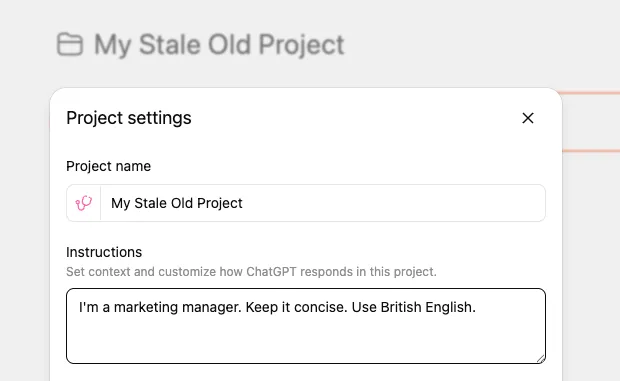
“I’m a marketing manager. Keep it concise. Use British English.”
That’s what most custom instructions look like. It’s a profile bio, not a working relationship. It tells the AI what you are, not how you think.
The result: you get generic output that technically follows your preferences but misses everything that matters. You spend time editing, correcting, re-prompting. And you blame the AI for not “getting it.”
What actually works: transferring judgment
Think about how delegation works with people. When you onboard a new team member, showing them around is day one. What actually makes them effective - and what lets you stop checking their work constantly - is transferring judgment. The stuff you learned from getting burned.
“Don’t send the client a proposal without running it past legal first” isn’t a process step. It’s a scar. You know it because something went wrong once, and now you know better.
AI tools work the same way. They’re capable. They just don’t have your scars.
Here’s the difference in practice:
Profile bio instructions:
“I’m a marketing manager, keep it concise, use British English.”
Judgment-based instructions:
“Never claim a metric I haven’t verified - flag it as unverified instead. Always flag when a recommendation requires budget approval. Our brand voice is confident but never aggressive - [example doc] shows the line. When writing for the blog, match the structure of [specific post] not [other post].”
The first tells the AI what you are. The second tells it how you think. That’s the gap.
What to put in your instructions
You don’t need to write an essay. Focus on four things:
1. Where mistakes actually hurt. Every project has 2-3 areas where getting it wrong causes a real problem, not just a messy one. For a marketing team, that might be “anything involving pricing needs sign-off” or “never reference competitor names in outbound content.” Name these explicitly.
2. Constraints with the why. Not “don’t do X” but “don’t do X because Y happens and it’s hard to catch.” When your AI tools understand why a rule exists, they apply it more consistently - and they’ll flag edge cases you didn’t think of.
3. Patterns for common tasks. If you have a process for writing a blog post, drafting a proposal, or preparing a report - write down the steps. The AI follows a known-good path instead of improvising one that’s 80% right and 20% subtly wrong.
4. What NOT to do. This is the hardest to write and the most valuable. It’s the list of mistakes you’ve already paid for. “Don’t use passive voice in customer emails” is a convention. “Don’t promise delivery timelines without checking with ops first” is a scar. Write down the scars.
My own audit
I audited the instruction files across six of my projects. The worst was 31 lines for my most active product - a system handling real user data and several decisions that took weeks to get right. Those 31 lines covered the basics: how to run things, how to name things.
Nothing about the areas where a mistake would cause a real problem. Nothing about the components that look interchangeable but can’t be swapped. Nothing about the decisions that took weeks to reach.
After the audit, that file went from 31 lines to 230. The additions weren’t more documentation - they were structured judgment following the four categories above. The effect was immediate. Fewer corrections. Less hand-holding. The threshold for what I could hand off moved significantly.
The hard part: keeping it alive
Writing good instructions once is the easy part. The hard part is keeping them current. Your knowledge grows, your projects evolve, your tools get smarter - but your instructions stay frozen from the day you wrote them.
This is the problem I kept running into. I’d write thorough instructions, then three weeks later the AI would make a mistake I’d already learned to avoid - but I’d never gone back to update the file. The instructions were stale almost as soon as I wrote them.
There are a few approaches that help:
The correction trigger. Every time you correct your AI, ask: should this be in my instructions? If you’re correcting the same thing twice, the answer is yes. This turns everyday friction into a feedback loop.
Automated analysis. Claude Code has a built-in /insights command that analyzes your session history and surfaces patterns - what’s working, where you’re hitting friction, and specific suggestions for what to add to your instructions. After 225 sessions, mine identified recurring failures from the same causes, planning sessions that kept getting interrupted, and five concrete rules to add to my instruction files. It’s like having someone audit your workflow and tell you where you’re losing time.
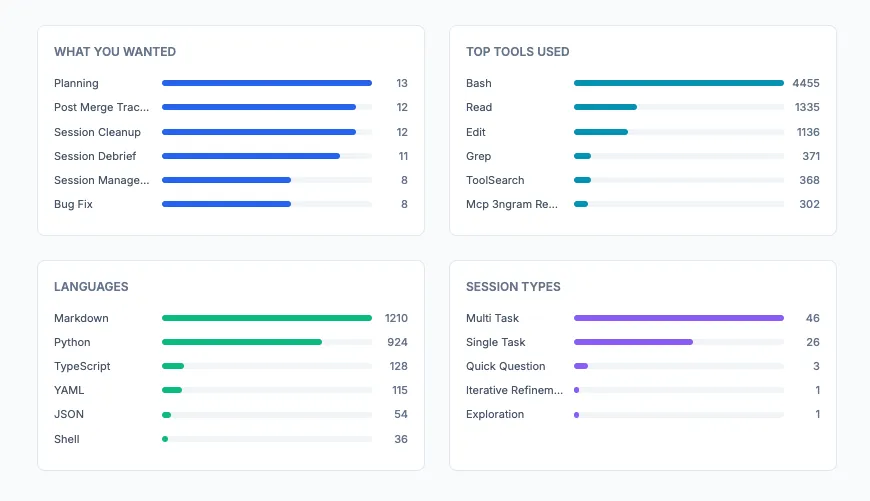
I also built a custom workflow-audit skill that goes deeper - it spawns parallel agents to mine conversation history, analyze session patterns, and cross-reference what’s automated versus what I’m still doing manually. It’s a more intensive process, but it surfaces things like “you’ve explained this constraint 14 times across sessions - just put it in the file.”
Cross-session memory and document search. The biggest gap in most AI workflows is that each session starts from zero. You make a decision in one conversation, and the next conversation has no idea it happened. This is the specific problem 3ngram solves. It does two things: it tracks decisions, commitments, and context across your AI tools - and it can index your actual documents (GitHub repos, files, notes) so your AI has both your accumulated knowledge and your source material to draw from. Instead of re-explaining your context every session or pointing the AI at the right files, it’s already there - memory and documents searched together.
The pattern across all of these: treat your instructions as a living system, not a document you write once. The people who get consistently good results aren’t the ones with the best initial instructions - they’re the ones who keep updating them.
The test
Here’s the test I use now: if something has burned me, or made me think twice, and I haven’t told my AI tools about it - I’m just waiting for them to find the same cliff.
Your agents are capable. They just know exactly as much as you’ve told them.
For engineering teams, this is becoming formalized. There’s an open standard called AGENTS.md that over 60,000 projects use. Anthropic’s Claude Code has CLAUDE.md files. Builder.io wrote a practical guide on what goes in them. The concept works anywhere you have persistent AI instructions - including the custom instructions field you set up six months ago and forgot about.
Related work
AI Brain Fry Is Real - But It's Not the Tools' Fault
Harvard Business Review says AI is frying workers' brains. My data - 1,986 commits and 1,900 AI sessions in 76 days - shows the opposite is possible. The difference isn't the tools. It's whether anyone invested in actually understanding them.
Your AI Strategy Is Collecting Dust
Most AI strategies fail before implementation starts. Not because the ideas are wrong - because the strategy was built for a board deck, not for the people doing the work. Here's how to build one that actually gets executed.
What Are AI Agents, Actually?
An agent is a system where the model decides the next step. That's it. Most things called 'agents' aren't - they're workflows with LLM-powered steps, which is usually the right architecture anyway. Understanding the actual distinction helps you buy smarter and build better.