Meta Prompting: Let AI Write Your Prompts
The most underused technique in AI: using the model to improve your inputs. How to generate, critique, and refine prompts using the AI itself.
TL;DR: Most people write prompts directly. Better approach: describe what you want, ask the AI to write the prompt, then ask it to critique and improve that prompt. The model understands its own input format better than you do. Use this loop - generate, critique, refine - and your results improve dramatically.
You’ve written hundreds of prompts. Some work. Some don’t. When they fail, you tweak words, add context, try again. It’s slow. It feels like guessing.
Here’s the thing: the AI knows what makes a good prompt. It’s been trained on millions of them. So why are you doing the hard part?
Meta prompting flips the script. Instead of writing prompts yourself, you describe what you want and let the model write the prompt for you. Then you ask it what’s wrong with that prompt. Then you fix it together.
This isn’t laziness. It’s leverage.
The Core Loop
Meta prompting has three moves. Use them separately or chain them together.
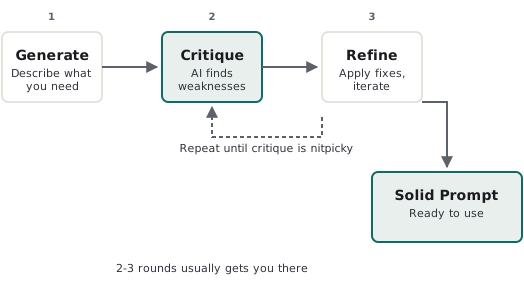
1. Generate
Don’t write the prompt. Describe what you need, and ask for the prompt.
Instead of:
“Summarize this document focusing on key financial metrics and risks.”
Try:
“I need to summarize quarterly reports for a CFO who has 2 minutes. She cares about revenue trends, cash position, and anything that might blow up. Write me a prompt that would produce that summary.”
The model returns a prompt. It’s usually better than what you’d write - more specific, better structured, includes things you forgot.
2. Critique
Take any prompt - yours or generated - and ask the model to tear it apart.
“Here’s my prompt: [paste prompt]. What’s wrong with it? What’s ambiguous? What would make this fail? How would you improve it?”
The model will identify gaps you didn’t see. Ambiguous instructions. Missing context. Edge cases. Conflicting requirements.
This works because the model knows what confuses it. It’s been confused by millions of bad prompts. It recognizes the patterns.
3. Refine
Now iterate. Take the critique, apply it, ask again.
“Good points. Here’s my revised prompt: [paste updated prompt]. Better? What’s still weak?”
Two or three rounds usually gets you somewhere solid. You’ll know you’re done when the critique becomes nitpicky rather than substantive.
When This Matters
Meta prompting isn’t always worth the effort. Use it when:
The prompt will be reused. If you’re building a template for weekly reports, customer emails, or code reviews - invest in getting it right. The compound returns are massive.
Stakes are high. Legal summaries. Medical explanations. Financial analysis. Anything where “mostly right” isn’t good enough.
You’re stuck. When direct prompting isn’t working after a few tries, step back. Ask the model why it might be failing. Often it’ll tell you exactly what’s missing.
You’re building systems. Prompts in automated pipelines need to be robust. They’ll see inputs you didn’t anticipate. Meta prompting helps you stress-test before production does. When I built the FDA document review system, iteratively refining prompts for each of the six specialized agents was critical - meta prompting turned unreliable first drafts into production-grade instructions.
Skip it for one-off tasks where “good enough” is fine. Don’t overthink a quick email draft.
Advanced Patterns
Once you’ve got the basics, these patterns unlock more.
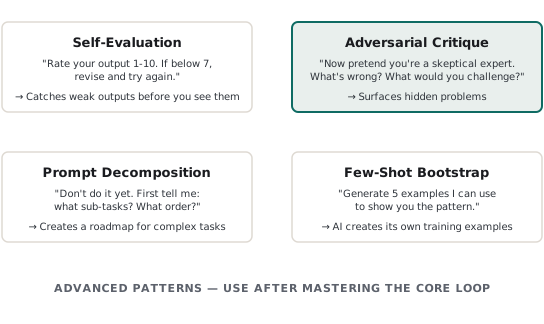
Self-Evaluation
Before the model shows you output, ask it to grade itself.
“After generating the summary, rate it 1-10 on: accuracy, completeness, and clarity. If any score is below 7, revise and try again. Show me only the final version with scores.”
The model catches its own weak outputs. You see fewer drafts, better quality.
Adversarial Critique
Ask the model to attack its own work.
“You just wrote this analysis. Now pretend you’re a skeptical expert trying to find holes. What’s wrong? What’s missing? What would you challenge?”
This surfaces problems the model “knows” but didn’t surface in the original output. It’s especially useful for arguments, proposals, and recommendations.
Prompt Decomposition
For complex tasks, ask the model to break it down.
“I need to analyze this contract for risks. Don’t do the analysis yet. First, tell me: what sub-tasks should this break into? What information do I need to provide? What order should we tackle this?”
You get a roadmap. Then you execute each step with focused prompts. Better than one sprawling instruction.
Few-Shot Bootstrap
Use the model to generate its own examples.
“I want to classify customer feedback as positive, negative, or neutral. Generate 5 example classifications I can use to show you the pattern. Make them realistic and cover edge cases.”
Now you have few-shot examples without manually creating them. Review for accuracy, then use them in your actual classification prompt.
The Meta-Meta Level
Here’s where it gets recursive. You can prompt the model to help you get better at prompting.
“I’m trying to get better at writing prompts. Here are three prompts I wrote recently: [paste them]. What patterns do you see in my approach? What am I consistently missing? What should I learn?”
The model becomes your prompting coach. It sees patterns across your work that you don’t.
Why This Works
LLMs are trained on text that includes instructions, prompts, and meta-discussion about how to use them. The model has seen countless examples of good and bad prompts. It knows what works.
When you ask it to write a prompt, you’re tapping that knowledge directly. When you ask it to critique, you’re using its pattern-matching against itself.
This isn’t the model being clever. It’s just prediction - but prediction informed by massive exposure to what makes instructions clear, specific, and effective.
Start Here
Next time you’re about to write a complex prompt, try this instead:
- Describe what you need in plain language
- Ask: “Write me a prompt that would accomplish this”
- Ask: “What’s wrong with this prompt? How could it fail?”
- Revise based on the critique
- Use the refined prompt
Do this three times with different tasks. You’ll feel the difference.
The goal isn’t to never write prompts yourself. It’s to use the model’s knowledge when it helps. Sometimes that’s generating from scratch. Sometimes it’s critiquing what you wrote. Sometimes it’s just asking “what am I missing?”
The model knows more about prompting than you do. Use that.